
This error code appears when your cables are having connectivity issues.
To troubleshoot, please try the following steps (If your Entagged reconnects at any point, there is no need to continue with the rest of the steps):
- 1Check that the end of the cable with the Foolography logo is the end plugged into your Entagged device:
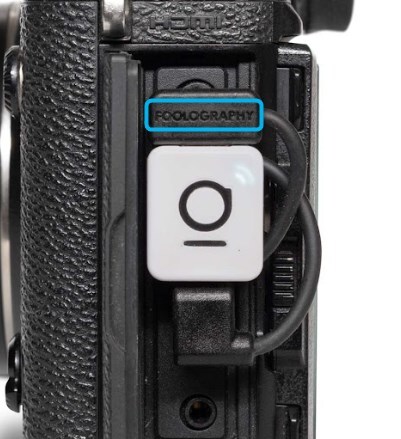
- 2Make sure the Entagged device is plugged in with the logo in the orientation of the picture above (with the line on the bottom).
- 3N1 Model Only: Gently twist the Entagged device to make sure it fits snuggly in the port.
Are you mid-shoot and need to quickly use an alternative tagging method? Click here for a brief explanation on how to pivot to QR tagging.